 |
Example Application Source Code |
|
Contents
[back to top]
3.1 Class structure
The Example Application contains the following 7 classes:
|
Classes
|
Description
|
|
CMyCode
|
This is the class where you should add your own Parasolid application code.
|
|
CSession
|
This class incorporates the code responsible for starting and stopping Parasolid. It registers the frustrum and starts the session as well as registering the error handler. See Chapter 4, "The Example Application", in Getting Started With Parasolid, for more details.
|
|
CAboutDlg
CExampleAppApp
CExampleAppDoc
CExampleAppView
CMainFrame
|
These classes are part of the MFC framework.
The graphical output (GO) functions and helper functions are in CExampleAppDoc, while the rest are in CExampleAppView. See Chapter 4, "The Example Application", in Getting Started With Parasolid, for more details.
You can ignore CAboutDlg (which contains code for the application's About dialog) and CMainFrame (which contains only MFC-generated code).
|
The relationships between the classes and the functional areas of each are detailed in Figure 3-1.
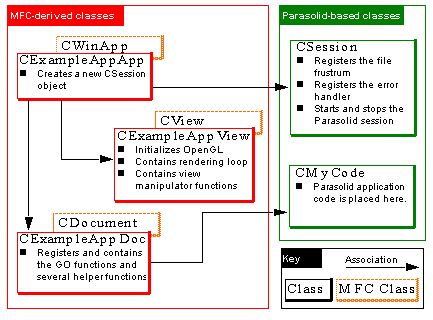
Figure 3-1 Relationships between the classes in the Example Application
[back to top]
3.2 File structure
The classes in the Example Application are split across the following files, containing the functionality shown.
|
File
|
Description
|
Example App
|
Initializes the MFC application. Creates a new CSession object.
|
Example AppDoc
|
Initializes the document and registers the graphical output (GO) frustrum functions. Stores a copy of the parts and geometries in the session.
|
Example AppView
|
MFC code for initializing the code and handling window events.
|
MainFrm
|
Standard MFC file.
|
GO
|
Part of the CExampleAppDoc class. It contains the GO functions as well as various helper functions.
|
OpenGL
|
Part of the CExampleAppView class. It initializes OpenGL.
|
Parasolid
|
Part of the CExampleAppView class. It contains the rendering loop.
|
Session
|
Registers the file frustrum and error handler, and starts and stops Parasolid.
|
MyCode
|
Contains the class encapsulation for the Parasolid application code you write.
|
Frustrum
|
Contains file based frustrum functions.
|
The relationships between these files and the functionality they contain are shown in Figure 3-2.
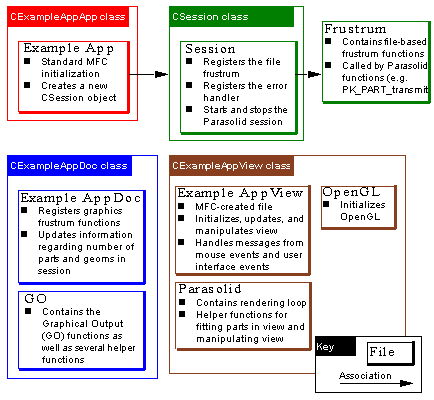
Figure 3-2 Overview of the files in the Example Application
[back to top]
3.3 Initializing Parasolid
The Example Application initializes Parasolid as follows:
-
CExampleAppApp instantiates a CSession class through the
m_session
member variable.
-
CSession contains the functions required for starting up and stopping Parasolid. It does the following:
-
Creates a new frustrum object and registers the following frustrum functions:
StartFrustrum (
fstart
)
AbortFrustrum (
fabort
)
StopFrustrum (
fstop
)
GetMemory (
fmallo
)
ReturnMemory (
fmfree
)
OpenReadFrustrumFile (
ffoprd
)
OpenWriteFrustrumFile (
ffopwr
)
CloseFrustrumFile (
ffclos
)
ReadFromFrustrumFile (
ffread
)
WriteToFrustrumFile (
ffwrit
)
These are the minimum frustrum functions that must be registered before the session is started. See Chapter 3, "Supplying A Frustrum", in Getting Started With Parasolid, for an introduction to the frustrum functions that you need to supply, and what they must do.
The graphical output functions are not registered at this stage, because they require access to document and view classes that have not been created yet. They are registered in CExampleAppDoc instead.
-
Registers the frustrum that was just created.
-
Registers the function PKerrorHandler as an error handler. This function is called and passed details just before a failing PK function is about to return. For simplicity, the error handler in the Example Application just echoes any error messages to the screen. Error handlers can be registered and unregistered at any time in the session.
-
Starts the session by calling PK_SESSION_start.
-
A new document is created and initialized as follows:
-
The document is created and MFC-specific initialization is handled by the MFC framework.
-
Specific initialization (such as setting the default view) is handled by the CExampleAppDoc constructor
-
The GO functions are registered in CExampleAppDoc::OnNewDocument, which overrides CDocument::OnNewDocument.
-
A new view is created as follows:
-
The view is created and attached to the document using the MFC framework.
-
Initializing view-specific information is handled by the CExampleAppView constructor.
-
OpenGL is initialized by CExampleAppView::OnInitialUpdate.
[back to top]
3.4 Executing calls to Parasolid
The following events occur when you click  in the Example Application:
-
The function OnTestBtn calls CMyCode::RunMyCode to execute any Parasolid application code you have placed there.
-
The parts and geometries in the session are extracted and stored in the document.
-
OnTestBtn calls CExampleAppView::OnUpdate() (via UpdateAllViews) to create a display list (a list of entities to display)
-
OnUpdate calls CExampleAppView::ReRender() which, together with calls to the GO functions, renders the display.
-
Finally, TestBtn calls CExampleAppView::FitPartsInView() to fit all the entities within the current window.
ReRender controls the rendering loop in the Example Application.
-
When rendering in shaded view, it calls PK_TOPOL_render_facet and passes it all the entities in the parts list.
-
When rendering in any line views, it calls PK_TOPOL_render_line and passes it all the entities in the parts list.
-
It calls PK_GEOM_render_line and passes it all the entities in the geometry list.
Each Parasolid rendering function then calls GO functions whch convert the rendering data into OpenGL form and populate the OpenGL display lists. Finally, CExampleAppView::OnDraw clears the screen and traverses the OpenGL display list and displays it to screen.
This sequence of events is illustrated in Figure 3-3.
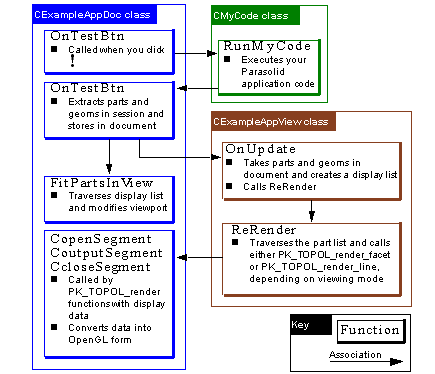
Figure 3-3 Order of events after clicking 
[back to top]