 |
The PS/Workshop Interfaces |
The PS/Workshop Interfaces
| <<< Module Structure | Chapters | Adding a New Menu Item to PS/Workshop >>> |
PS/Workshop functionality is made available to modules through a number of COM interfaces. These interfaces have been designed to correspond as closely as possible to the Microsoft Foundation Classes (MFC) Multiple Document Interface (MDI) paradigm common in many Windows-based applications, including PS/Workshop.
Similarly, the structure of a module created using the PS/Workshop AppWizard is designed to emulate the MDI structure, and provides the following classes:
These classes are described in full in Chapter 5, "Module Structure".
|
The IPSWApp interface represents the overall PS/Workshop application. There is exactly one IPSWApp interface for each instance of PS/Workshop. The IPSWApp interface is supplied to a module when the module is first loaded. The IPSWApp interface contains functions for modifying the PS/Workshop user interface, opening documents and registering callback functions. |
|
|
The IPSWDoc interface represents each of the PS/Workshop parts (documents) currently open. For each open document there exists a corresponding IPSWDoc interface pointer. Those functions called from IPSWDoc only affect the associated PS/Workshop document. |
|
|
Each document open in PS/Workshop has one or more views attached. Each IPSWView is associated with an IPSWDoc. Note: In the current version of PS/Workshop there is only one IPSWView associated with each IPSWDoc. |
|
|
Each of these interfaces can be obtained from an IPSWDoc interface, and as such they only affect the associated document. They allow control over |
|
|
Each of these interfaces can be obtained from the associated IPSW interface (for example IPSWEnumParts can be obtained from IPSWParts). They allow the entities associated with each interface to be enumerated. |
|
|
This interface can be obtained from IPSWDrawList (in which case it contains the current draw options). It provides control over how particular entities are displayed in the draw list. IPSWDrawOpts is somewhat different from other interfaces, in that it can also be created and passed to the IPSWDrawList interface (in which case it contains the new draw options). |
Figure 6-1 shows how the various PS/Workshop interfaces interact. For a complete reference for all the functions available in each COM interface, see Appendix A, "Interface Functions". For an introduction to the PS/Workshop draw list, see Chapter 9, "The Draw List".
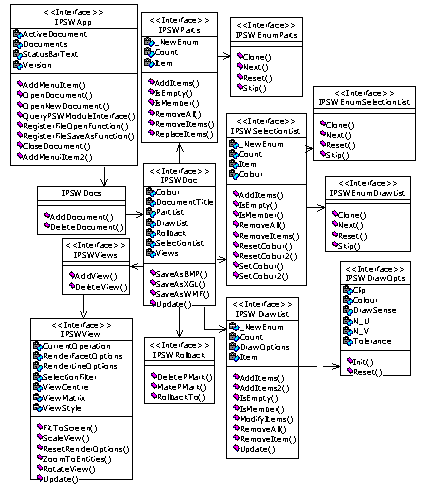
Figure 6-1 The PS/Workshop COM interface
| <<< Module Structure | Chapters | Adding a New Menu Item to PS/Workshop >>> |