 |
Event Handling Within A Module |
Event Handling Within A Module
| <<< Using COM in PS/Workshop | Chapters | Module Structure >>> |
In order to be recognized as a PS/Workshop module and loaded by PS/Workshop, all modules must support the IPSWAddIn interface.
In addition, in order to provide event handling capability, all modules must support IPSWEvents interface, so that the module can receive messages from PS/Workshop. See Appendix A, "Interface Functions" for a complete reference of all PS/Workshop interfaces.
If your module does not support the IPSWEvents interface, it can only access CAddonMain level functionality. In particular, it cannot access any documents which are opened in PS/Workshop.
The base class CAddinImpl that is created by the PS/Workshop AppWizard sets up the necessary support for both these interfaces automatically, and encapsulates a CAddonMain object.
Modules created using the PS/Workshop AppWizard route any messages from the CAddinImpl class to the CAddonMain class. Events can then either be handled by the relevant function inside this class, or passed on to CAddonDoc. In turn, events can either be handled inside CAddonDoc or passed to CAddonView to handle. This mechanism is illustrated in Figure 4-1.
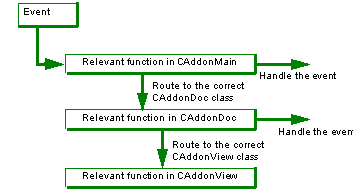
Figure 4-1 The message handling mechanism within a PS/Workshop module
The class you decide to use to handle a given event depends on the functionality you want for the operation concerned, as shown in the table below:
The following message handlers are available for each of the classes above. Full information about each message handler is given in Chapter 5, "Module Structure".
|
OnCmdMsg OnDocOpen OnDocClose OnViewOpen OnViewClose OnAppDestroy OnSelectTopols OnPartChange |
|
|
OnCmdMsg OnDocClose OnViewOpen OnViewClose OnSelectTopols OnPartChange |
|
Modules created using the PS/Workshop AppWizard use several of the available message handlers to ensure that the list of CAddonDoc and CAddonView classes are correctly created and destoyed.
The OnCmdMsg functions available in CAddonMain, CAddonDoc, and CAddonView can be called from PS/Workshop when the user chooses a menu command that has been added by a module.
As with other events, modules route menu command events from the CAddinImpl class to the relevant function in CAddonMain: in this case, CAddonMain::OnCmdMsg. This function can then either handle the event or call the corresponding CAddonDoc::OnCmdMsg function. In turn, this function can either handle the event or pass it to the CAddonView::OnCmdMsg to handle.
The ID associated with any particular menu command must be unique within the module, otherwise the function called may not be the correct one. Section 2.3, "Adding a Hollow menu item", provides an example of how you can do this.
Figure 4-2 displays the command handling mechanism in more detail.
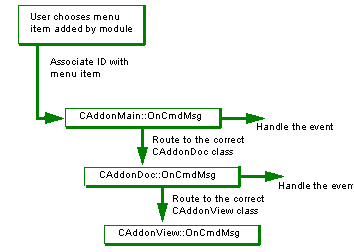
Figure 4-2 The command handling mechanism within a PS/Workshop module
OnCmdMsg can also be called if a user registered File type is opened or saved (as specified using the IPSWApp::RegisterFile XXXFunctions) in which case the second parameter contains the name of the file to open/save.
When you handle an event using the OnCmdMsg function for a given class, you should set the value of the
hr
variable to S_OK to ensure that no classes further down the event chain are called. An example of how this might be done is shown below:
| <<< Using COM in PS/Workshop | Chapters | Module Structure >>> |